Recover faces carefully
Choose Normal or Plus face enhancement to improve facial detail in portraits and group photos while retaining control over the strength.

AI old photo restoration
PhotoBoost combines restoration, face enhancement, color recovery, low-light correction and upscaling in one workflow. Improve a scanned print or older digital photo in seconds, then compare the result before downloading a new copy.
One free AI enhancement · JPG, PNG, WebP and HEIC · Up to 45 MB
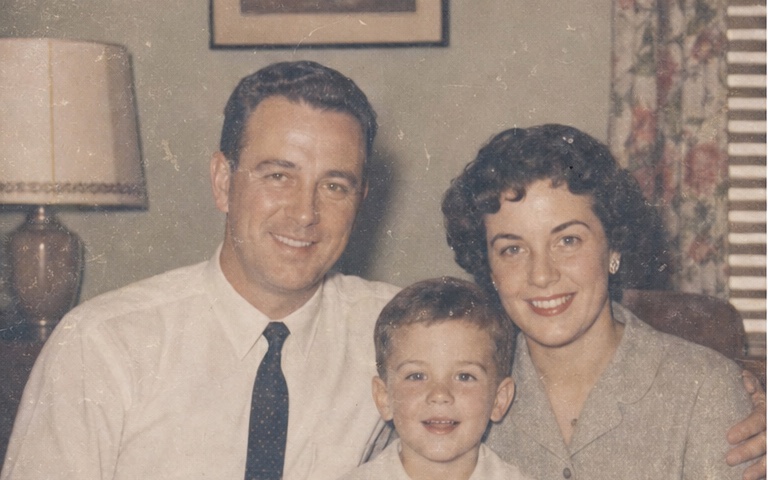
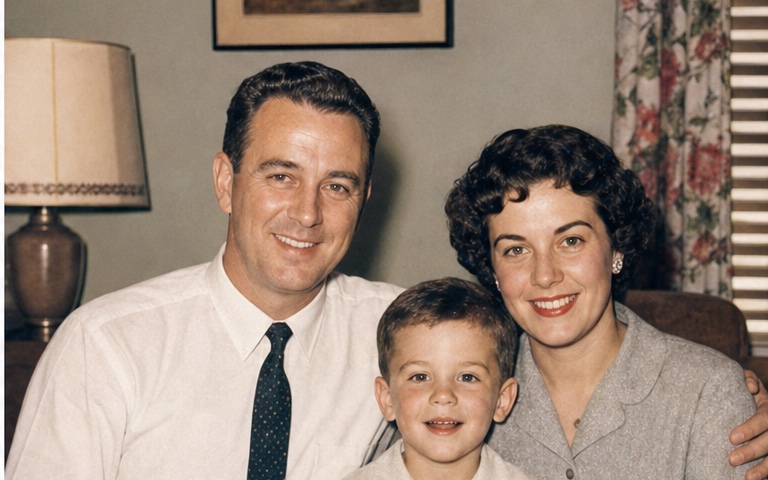
Illustrative comparison. Results vary with the source image and selected tools.
Choose Normal or Plus face enhancement to improve facial detail in portraits and group photos while retaining control over the strength.
Restore faded color automatically, adjust brightness and contrast, or use AI Colorize for a separate black-and-white photo workflow.
Upscale the restored image by up to 4× so a small scan has more resolution for modern screens, albums and prints.
How it works
Start with the clearest, highest-resolution capture available and avoid glare when photographing a physical print.
PhotoBoost restores clarity, faces, color and lighting according to the options you select.
Compare the result with the source, make final adjustments and download without changing the original scan.
Refresh portraits, celebrations and everyday moments preserved in aging prints.
Improve flat contrast and weakened color from older film and paper.
Combine restoration with upscaling for a more useful digital copy.
Restore clarity first, then optionally create a colorized interpretation.
PhotoBoost can improve softness, low resolution, faded color, poor lighting and unclear faces. Large missing sections, severe tears or complex physical damage may still require manual retouching.
A high-resolution scan is ideal. If a scanner is unavailable, photograph the print straight-on in even, glare-free light and keep the camera steady.
Yes. Colorize is a separate AI tool in the PhotoBoost editor, with an intensity control so you can blend between the original and generated color.
No. The editor works from an uploaded copy and exports a new result. Keep the original scan as the archival source.
Upload one image, compare the result and keep your original untouched.
Enhance My Photo Free